

- Rocktape Kinesiology Tapes
- Hot Cold Therapy /Cryotherapy
- Massage Lotions, Creams and Balms
- Altra Acupuncture Needles
- Anatomy CD/ DVDs
- Anatomy Charts & Posters
- Anatomical Models
- Ankle Braces and Supports
- Back & Neck Care
- Balance Equipment
- Bracing & Supports
- Cefar Compex
- Chinese Medicine
- Clinical Assessment Forms
- Clinics in Motion DVDs
- Compression Therapy
- CPM Machines
- DonJoy Knee Braces
- Electrotherapy Equipment
- Hand Therapy
- Harley Memory Foam Products
- Kinesiology Tape & Strapping Tapes
- Massage Balls
- Monitoring
- NAQI Massage Products
- Parallel Bars & Steps
- PhysioBob’s Jobs Recruitment
- Physiotherapy Educational DVDs
- Physiotherapy & Medical Books
- Physiotherapy Plinths & Massage Tables
- PPE Essentials
- Real Bodywork DVDs
- Saddle Stools & Chairs
- Sports First Aid
- TENS & Muscle EMS
- Ultrasound Gel
- Wrist / Thumb Braces & Supports
- Yoga Products
Purchase Orders & Quotations
Obtain an official Quotation or generate a Purchase Order
We do not accept purchase orders sent via email, fax or post. If you have generated an internal purchase order at your place of business then please add those details to a Purchase Order (PO) invoice that you can generate directly on our website. This is the only way to have that PO turned into an actual order awaiting payment.
Our system will generate a Purchase Order invoice (with no obligation of course) by registering as a new customer, adding items you wish to purchase to a shopping cart and then selecting 'Generate a Purchase Order' or 'Generate a Quotation' on the checkout payment page.
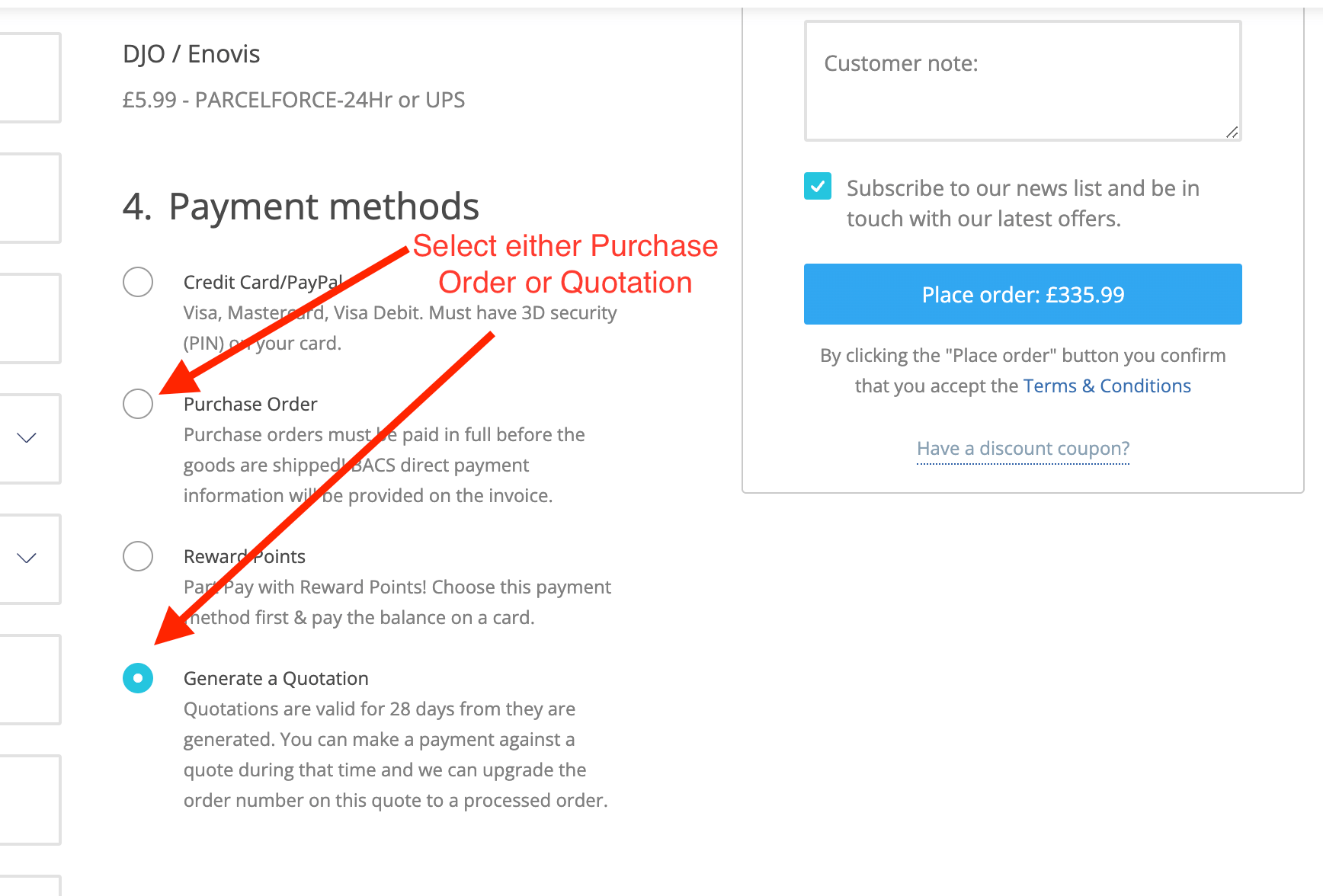
You will be emailed a copy of the PO or Quotation invoice to pass on to your finance department and will also have options to print it or download it as a pdf.
You can register as a new customer at the top right of our homepage: https://www.physioshop.co.uk
All companies, NHS trusts, Armed Forces, Schools etc must register and complete their purchase orders on this website.
If you wish to generate a PO but do not have any official PO Number from your business you can type anything you like into the PO into the required fields at the bottom of the checkout page. They are for your reference only and are not used in anyway by us.
To complete the process, accept the terms and click on submit order. That will then generate your Purchase Order invoice.
PAYMENTS
Bank transfer details will be shown at the bottom of the purchase order invoice.
Our company name in relation to the payment of purchase orders is The Physio Shop Limited.
For foreign payments please note that the invoice amounts (and therefore the amount to be transferred) are the total GBP "£" amount showing on any invoice.
Purchase Orders will not be shipped until full payment is received. When you know that a payment has been authorised and sent to our bank please let us know so we can prepare the order for processing and dispatch.
Again there is NO obligation for the generation of any purchase order or quotation. Quotations are valid for 28 days following their creation.


